If you record courses, a video podcast or pieces for social media, this combination covers the entire workflow on a mid-range computer running Linux, Windows or macOS, and every project stays editable so you can make corrections without starting from scratch. With the 2026 versions, the leap is noticeable in stability, in reversible retouching and in an interface that finally helps instead of getting in the way.
What has changed in Kdenlive, Audacity and GIMP?
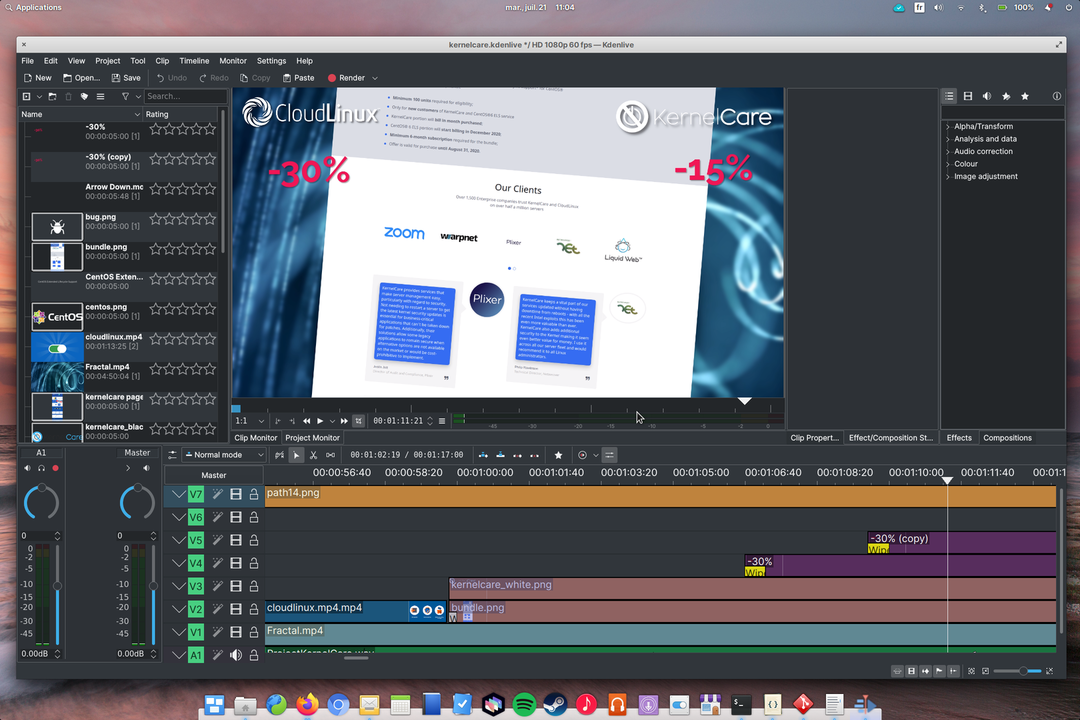
Kdenlive opened the season with its summer 26.08.0 release, published on August 31, 2026 with eleven crash fixes and a more robust undo stack, and ten days later came 26.08.1 to finish off bugs in preview, sequence deletion and ripple editing, according to the 26.08.0 announcement and the 26.08.1 notes. A good part of the new features was signed by new contributors, something the team celebrates as a 2026 habit.
On the timeline the changes are hands-on, because you can now reorder tracks by dragging, the program automatically creates audio tracks when a clip brings more channels, and gap markers help locate silences. The titler gained snapping and copy-paste of objects, the mixer allows additive solos with Shift and click, and multicam editing aligns clips by the timecode in their metadata.
It is worth noting that the update requires MLT 7.38.0 as a base and changes the default transition from crossfade to luma, so check your old templates before opening an inherited project.
The new GPT-6 and Claude open the way to digital worker templates
Fresh, quality software
Audacity 4, presented on September 3, 2026, is the biggest overhaul of the editor in its more than twenty-five-year history, since the program was born in 2000 and is used every year by millions of creators, as detailed on the official Audacity 4 page. The interface was rebuilt on Qt for macOS, Windows and Linux, clips can now overlap, be grouped and edited without destroying the original audio, and the split tool responds to one of the community's most upvoted requests.
The program also adds volume envelopes inside the clip, ripple editing when deleting, workspaces for podcast, music or restoration, and a start screen that brings together local projects and cloud projects from audio.com. Audacity 3 projects open as they are, keyboard shortcuts are preserved and the license remains GPLv3, so nothing you have learned is lost.
GIMP completes the trio with the most anticipated change in its recent history, because version 3.0 of March 2025 closed seven years of development, debuted non-destructive editing in the most used filters, migrated the interface to GTK3 and improved exchange with PSD and DDS, according to its release notes. A year later, GIMP 3.2 added link layers that follow the external file and vector layers with editable fill and stroke, and the future 3.4 points to a new format based on compressed XML that will retire XCF, according to the August 2026 preview.
What equipment do you need before starting?
You don't need an expensive workstation, because a laptop with eight gigabytes of memory, a quad-core processor and a solid-state drive handles 1080p projects if you use reduced-resolution previews. All three programs run on Windows, macOS and Linux, which lets you start on whatever system you already have and migrate to Linux later without changing tools or shortcuts.
| Program |
Reference version in September 2026 |
Role in the studio |
Formats worth mastering |
| Kdenlive |
26.08.1 |
Editing, color, titles and export |
MP4 with H.264, WebP, WAV |
| Audacity 4 |
4.0 |
Recording, cleanup and mixing of voice and music |
WAV, FLAC, OGG, MP3 |
| GIMP |
3.2 |
Thumbnails, headers and channel graphics |
XCF, PNG, JPG, WebP |
Before recording anything, create a folder per project with subfolders for video, audio, graphics and export, and install the versions in the table to work on what has been tested here. Also save a copy of the originals as soon as you dump the cards, because no editor saves you from a file deleted before the backup.
The crypto week: Circle launches its blockchain with BlackRock and Visa as validators
How is a video's workflow organized?
The order that works best starts in GIMP with the thumbnail and titles, continues in Audacity with recording and voice cleanup, moves to Kdenlive for editing and ends with the final mix and export, because each phase delivers finished materials to the next. Working with that chain also teaches you to spot problems early, since background noise is heard in Audacity before it ruins an afternoon of editing.
- Draw the thumbnail and titles in GIMP at the dimensions of the target platform and export them as PNG.
- Record the voice in Audacity at 48 kilohertz and 32-bit floating point, with the per-track meter in view.
- Clean up breaths, normalize the level and export the voice mix as WAV.
- Edit in Kdenlive with the voice as a guide, add shots, titles and music, and adjust the color.
- Send the mix back to Audacity if it needs fine restoration and reimport it.
- Export the master in high quality and then the copies for each platform.
The difference matters, because the master is archived and the copies come out of Kdenlive without touching the project, so a thumbnail or a title can be fixed in minutes. That way, a ten-minute video fits into an afternoon when the materials arrive organized.
How do you edit and export the video in Kdenlive?
Open a profile that matches your camera, for example 1920 by 1080 at 25 or 30 frames, and move the clips to the bin before touching the timeline, because sorting by folders and renaming each take saves you searches. Enable playhead snapping so cuts land on clip edges, guides and markers, and copy selections to new sequences when you prepare short versions for social media.
For color, first apply MLT's HSL correction or curves with multiple stops, and use mathematical expressions in effects when you need exact values. The transform effect now lets you move the anchor point off-center, and the rectangular alpha mask is finally animatable, so fake camera moves stay inside the editor.
The titler deserves a moment of its own, because pasting objects between titles and aligning to the center with visual guides speeds up titles. When you edit a title, the timeline clip updates in place without duplicates, so changing a name or a date doesn't break the edit.
When exporting, first generate a master in MP4 with H.264 at a high bitrate, and then the vertical or compressed copies each network requires. If an old project changes aspect ratio when you open it, check the default transition and the installed MLT version, because those are the two behavior changes in this series.
How do you record and clean up audio in Audacity 4?
Choose your microphone in the audio settings and record a thirty-second test with your normal voice, because setting the gain this way avoids peaks that no restoration can fix later. Trim with the clip's upper handles, stretch with the lower ones when you need to fit music, and group related clips to move whole blocks without throwing the narration out of sync.
Cleanup starts with the simple things, since the noise reducer with a sample of the silence in your room, a fade on every cut and the volume envelope get the voice ready without aggressive effects. Then apply compressor and limiter with the redesigned windows, and leave reverb for the end in short doses.
This is where Audacity 4 takes center stage, since ripple editing decides whether deleting closes the gap or respects the rest, and VST3, Audio Units and LV2 plugins coexist with the built-in effects. Save the project, publish a copy on audio.com if you want to share it, and export as WAV to take the mix to Kdenlive without loss.
The subscription trap: easy to enter, hard to leave and more expensive every time
How do you prepare thumbnails and graphics in GIMP?
Work on the thumbnail at twice its display size, for example 2560 by 1440 if the platform shows it at 1280 by 720, because the text arrives sharp on large screens and on mobile. Write the headline with the text tool, which supports outlines, shadows and bevels without losing editing of font and size, and let the brush expand the layer when the stroke goes past the edge.
After all, the feature that saves the most time is the non-destructive filter stack, which lets you tweak a blur or a curve hours later and see the result on the canvas instantly. Select several layers at once to move them together, link external images as link layers when a logo repeats, and draw shapes in vector layers with editable fill and stroke.
Export the thumbnail as JPG at high quality and the titles with transparency as PNG, and keep the XCF with its layers intact. If you import a PSD from a designer, check texts and layer styles before flattening anything, because compatibility has improved a lot but every foreign file brings its own surprises.
The unavoidable glitches and how to work around them
The classic glitch is audio that sounds different after exporting, and it almost always comes from mixing sample rates, so set Audacity to 48 kilohertz from the start and check that Kdenlive uses the same setting. The second usual stumble is fades that click, which are fixed with fades of ten to twenty milliseconds on every voice cut and with loop playback of the problematic region.
In video, stutter is eased with proxy clips and reduced-resolution preview, and pixelated text is avoided by designing in GIMP at double size. If Kdenlive closes when deleting sequences or changing preview settings, update to 26.08.1, which fixes those specific crashes.
A free studio that competes without asking permission
What the 2026 versions leave behind is a complete studio where each piece does its part: Kdenlive sustains daily editing with a stability that finally inspires confidence, Audacity 4 modernizes its base without breaking what you have learned, and GIMP 3.2 turns reversible retouching into routine. Put together your first short piece with this chain, archive the master and its materials, and the next one will come out in half the time.