There is a gesture you repeat every day without thinking: typing a password to get into your email or your bank. That everyday ritual is also the most fragile point in your digital life, because 77% of hacking breaches involve stolen credentials, according to Verizon data cited by the FIDO Alliance. That is why passkeys arrived to retire that gesture and, in September 2026, they are already part of your daily life on phones and computers on other platforms, although on Linux the path is different.
What is a passkey and what changes compared with a password?
Imagine signing into your account without typing anything and without anyone being able to steal your key. The site sends you a challenge that your device knows how to answer, because it holds a secret half that never travels over the network. You authorize it with your PIN or your fingerprint, and the server checks it against the public half it stored when you registered.
That means there is nothing to steal in a leak and nothing that can be extracted from you with a fake email: the private key never leaves your device and each response is only valid for the site that requested it. Synced passkeys travel encrypted between your devices inside your manager, while device-bound ones live only in their hardware. The FIDO Alliance gathers figures from those who have already migrated, with sign-ins up to six times faster according to Amazon and a success rate four times higher according to Google.
- The secret half never leaves your device, so a leak at the service does not expose it.
- Each response is only valid for the site that requested it, so a fake page cannot reuse it.
- The encrypted copy in your manager restores access if you change device or lose one.
On Linux the piece that makes all this invisible on other systems is missing, so you have to choose your vault carefully. And that choice conditions everything that follows, from synchronization to recovery if you lose a device.
Google resurrects JPEG XL three years after kicking it out of Chrom
What do you need before you start?
Before touching anything, update your system and choose a browser with a good relationship with passkeys, such as Chrome or any Chromium derivative (e.g. Edge, Brave, Vivaldi) in recent versions, which let you manage them from the extension without fighting the system. Firefox also plays, though with some nuance worth checking in its documentation before taking anything for granted.
Then create your free Bitwarden account if you do not have one yet and install its browser extension and, if you like, the desktop application for Linux, which makes it easier to organize your vault calmly outside the browser. That covers almost all the preparatory work.
If you come from another manager, first import your CSV file into Bitwarden and spend ten minutes deleting duplicates and dead accounts. Starting with a clean vault prevents three old passwords from coexisting with your first passkey and saves you confusion when the browser offers to choose between them.
| Where your passkeys sleep on Linux |
Synchronization |
Ideal for you if |
| Bitwarden extension in the browser |
Encrypted across all your devices |
You want to sign in without passwords day to day |
| FIDO2 physical key via USB or NFC |
None, it lives in the hardware |
You protect critical accounts or shared devices |
| Browser's built-in manager |
Tied to your browser account |
You prefer not to install anything else |
The subscription trap: easy to enter, hard to leave and more expensive every time
How do you get Bitwarden ready to store passkeys?
The trick lies in a little-visible setting in the extension. Bitwarden asks whether it can offer to save passkeys, and if that box is left unchecked, the browser will not even offer you the option when a site supports it.
- Install the Bitwarden extension in Chrome, Edge or Firefox from the official store and pin its icon to the bar so you always have it at hand.
- Open the extension, go to Settings and then Notifications, and check the box that allows it to ask to save and use passkeys.
- Review the list of excluded domains so that no site where you prefer your physical key falls under the vault's control.
- Create a folder called Passkeys inside your vault to locate at a glance each key you save.
- Write down your recovery email and keep your master password on paper, because if you lose access to the vault, no passkey will open its own house.
The desktop application for Linux lets you review each item on a large screen and copy data without wrestling with small windows. And the best part is that Bitwarden works on Linux and on your other systems, which makes it easy to carry the same passkeys from laptop to phone without exporting anything by hand. Lock it with a PIN when you step away and keep the master password only for cold starts.
How do you create the first passkey and sign in with it?
To start, choose a large service that already speaks the language of passkeys, such as your Google account or your GitHub profile, and look in its security settings for the button to create a passkey. The browser will open a system dialog asking where to store it: choose Bitwarden instead of the device option so the key is born inside your encrypted vault.
Confirm with your PIN or your fingerprint and that's it: the extension associates the passkey with that item and from that moment on signing in is pressing a button and confirming. The next time that site asks you to identify yourself, Bitwarden will offer you the stored key without you typing a single letter.
- Open the service's login page and start signing in with a passkey instead of typing your password.
- Choose your Bitwarden passkey in the dialog and confirm with your PIN or your fingerprint.
- If something goes wrong, sign in with your usual password and check that the passkey appears in your vault item.
The same trick opens your own vault: Bitwarden allows registering up to five passkeys to sign in without a password, although for them to also decrypt your data the browser and the authenticator must speak PRF, as Chrome and the YubiKey family do. And a detail specific to Linux: before signing in with a passkey in the extension, detach it into its own window with the pop-out button.
20 keys to understanding how the SEC wants to bring DeFi to Wall Street
Is it worth buying a FIDO2 physical key?
A physical key is a USB dongle or an NFC card that stores your passkeys inside its chip and never releases them: to sign in you touch it and enter its PIN, with no clouds or synchronizations in between. That closedness is its virtue, because neither a leak at the provider nor the theft of your laptop exposes the secret half.
On Ubuntu, where there is no system vault that syncs keys, the key covers precisely the most delicate gap: shared devices, ephemeral sessions or accounts you cannot afford to lose. The matrix at passkeys.dev, updated in May 2026, confirms that device-bound passkeys work on Linux precisely through these keys.
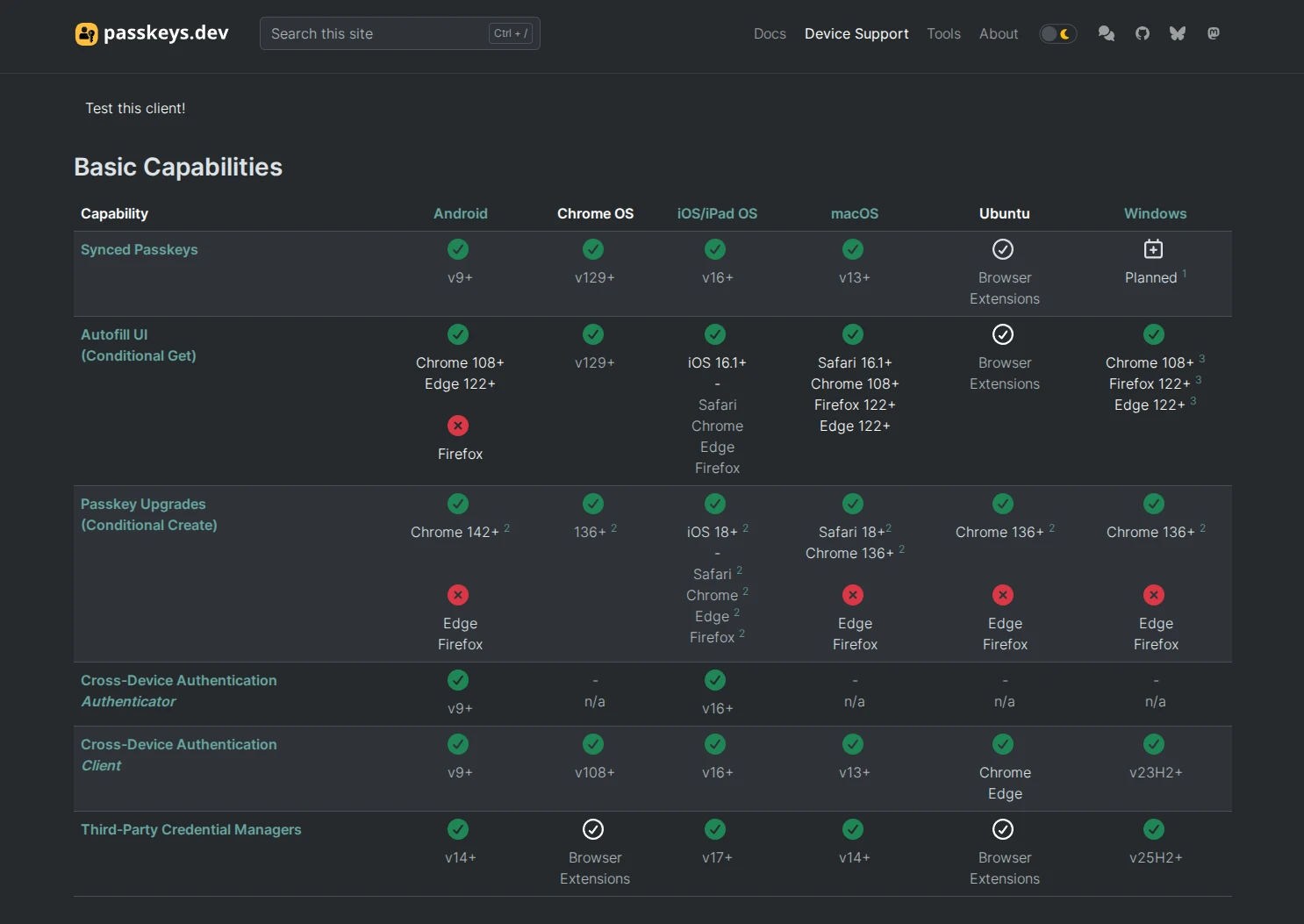
When choosing a model, look at the connector that is plentiful on your desktop, because a pure USB-C will not fit an old desktop without an adapter, and consider NFC if you tap your phone to the reader daily. Create the key's PIN at a calm moment and keep its recovery codes next to your master password.
Even so, do not buy hardware for everything: each key has its price and losing it without a copy locks you out. Reserve the key for email, banking and your code forge, and leave the rest in Bitwarden.
What fails on Linux and how is it fixed?
The classic mistake is expecting Linux to behave like Windows or macOS, with a system keyring that solves everything. Here the browser rules: Chrome and Edge manage passkeys from the extension with ease, while Firefox advances at its own pace and it is worth checking each case in its documentation before taking anything for granted.
Another common stumble is unlocking the vault with a passkey, which requires PRF at both ends of the cable. Chrome speaks it, but its user profiles do not, so if you sign in with a corporate or secondary profile, the key will identify you and then ask for your master password to decrypt. It is not an error: it is the extension asking you for the other half of the secret.
It also happens that the extension ignores your passkeys on certain sites, and there are usually two causes: you are trying to sign in with the extension pinned to the bar instead of detached in its window, or that domain ended up on the excluded list. Check the notification settings, clear the list and repeat the operation with the extension in its own window.
And think about the day of disaster: export your vault in encrypted JSON every few months and register a second passkey on another device for your vital accounts. Those who put their whole digital life on a single laptop without a copy end up learning this lesson the hard way. Keep that file where you keep your important papers, not next to the laptop it protects.
3 open source software tools to take your first steps in robotics
The day you stop typing passwords
When your ten or twelve daily services ask for a passkey and Bitwarden answers for you, the master password becomes the only one your memory must guard. Phishing loses its bait, because there is no longer a secret you can drop on a fake page however convincing it looks.
There is a way to go, of course: too many sites still ask for the usual password as a safety net and on Linux each browser goes its own way. But every passkey you save today is a door that no longer opens with a database theft, and that, in September 2026, is the cheapest security improvement you can get without spending a single euro. Start with one account, check that you can sign in and out without friction, and repeat with the next one whenever you feel like it.