All of them install on the desktop except one that lives inside the browser. But perhaps the most important point is that none of them requires a subscription to work, and they won't make you miss Adobe at all.
The moment to leave Adobe
Creative Cloud Pro, the plan that bundles more than twenty applications, costs $69.99 a month in the United States, according to the price breakdown compiled by Just Creative. A bit of history: that same suite of applications cost $52.99 in 2021, or in other words, a 32% increase between 2021 and 2026.
You might think the increase translated into highly advanced features and a more polished app, but the reality is that most of it has gone toward artificial intelligence features that a good part of users had not asked for. And paying for a single app doesn't help either, since a single standalone application costs $22.99 a month.
If we add to that the Photography plan with one terabyte that combines Photoshop and Lightroom for $19.99 a month, according to Adobe's official page. Even so, adding two or three programs puts the user back in the territory of forty or fifty dollars every month.
The obstacle to switching is almost never money. It is the inertia of having your files, settings and workflows tied to a tool you already know, and that learning cost is exactly what the alternatives have spent years trying to reduce.
A shift in the sector
However, the response to this situation came on October 30, 2025, when Canva made Affinity free, the suite that previously sold Photo, Designer and Publisher separately, according to its official announcement. It was the most aggressive move since the company bought Affinity in 2024.
At the same time, open-source projects have closed technical debts they had been carrying for years. GIMP released version 3.2 on March 14, 2026, Inkscape 1.4.4 on May 6 and darktable 5.6 on June 21. All well-known tools, with professional quality, that directly target the three most important points of the Adobe suite.
Trust in open-source software is no longer an ideological stance. In security and privacy it has accumulated years of documented cases, such as that of GrapheneOS, which turns a Pixel phone into a fortress against tracking.
With that calendar on the table, the interesting question is no longer whether a free alternative exists. What matters now is what you lose by switching and in which cases continuing to pay the fee is still the sensible decision.
Google resurrects JPEG XL three years after expelling it from Chrom
Affinity by Canva, the suite they give away to pressure Adobe
Affinity is no longer three programs. Since the end of October 2025 it is a single application that combines image editing, vector drawing and page layout, and Canva distributes it free to anyone who opens a free account, according to its press release.
It works on macOS and Windows, and the iPad version is announced for later. With that you can set up the complete workflow on your own machine without signing up for any subscription. It is the only one of the five that combines retouching, vector and layout in a single installation.
It is worth clarifying that free does not mean complete. The artificial intelligence features, including generative fill and background removal, sit behind Canva Pro, which costs about $15 a month or $120 a year, according to TechRadar.
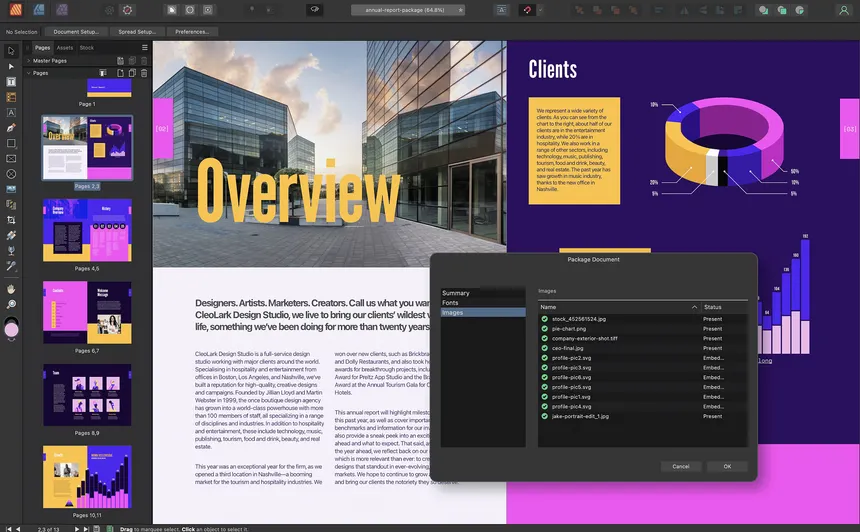
On the other hand, the professional core, the one used by the former Affinity 1 and 2, remains free. That nuance separates two things that are often confused: the software you use every day costs nothing, and what you pay for is the artificial intelligence extra.
Canva is not a foundation and its calculation is simple. It gives away the suite to sell corporate licenses and AI services, so the promise of "free forever" depends on a private company and not on a free license.
Anyone migrating should export their files to open formats and not tie their entire workflow to a single provider. That is the price of swapping Adobe for Canva instead of swapping Adobe for independent software.
If you are looking for a complete suite without paying, this is the option that comes closest to Adobe's. It gives you retouching, vector and layout in the same environment and saves you from juggling three different programs with three different formats.
GIMP 3.2 and the photo retouching that no longer calls for Photoshop
GIMP 3.2 arrived on March 14, 2026 with the feature the community had been demanding for years: non-destructive layers. The version adds link layers, which behave in a way similar to Photoshop's smart objects, according to the official release notes.
It also incorporates vector layers created directly from the path. For an amateur photographer, that set of changes solves much of the work that previously forced you to open Photoshop, and it does so without abandoning the GPL license.
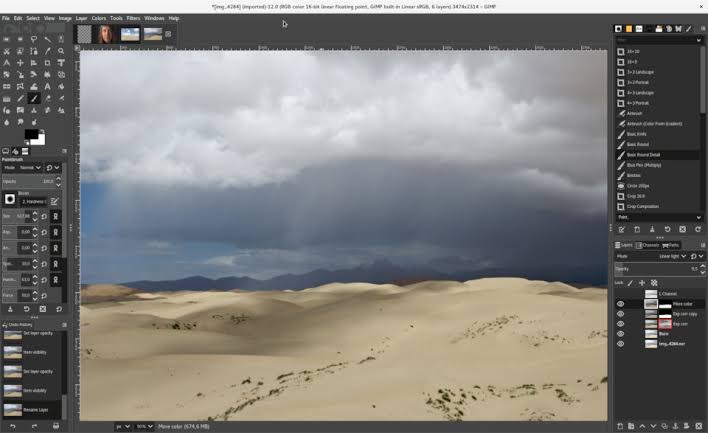
The formats section has grown just as fast. GIMP now exports Photoshop PSB, SVG and JPEG 2000, and imports Adobe patterns and layer styles. Version 2 of the MyPaint brush adds twenty new brushes.
You can install it on Windows, macOS and Linux, and on Linux you also have AppImage, Flatpak and Snap so you don't depend on your distribution's repositories. That gives you room to try it without touching the system.
Its limits remain where they were. The professional CMYK workflow for print does not compete 100% with Photoshop, but it keeps improving, the learning curve maintains its reputation and there is no integrated artificial intelligence. That said, the project publishes new versions regularly and the community responds quickly in the forums.
For photo retouching, composition and preparing images for the web, it covers most of the daily work without asking for a monthly contract in return. That balance between power and cost is hard to argue with.
Inkscape 1.4.4, the free vector tool that speaks the standard language
Inkscape 1.4.4 was published on May 6, 2026 as a maintenance update. The release fixed twenty bugs that crashed the program outright and added packages for Windows on Arm processors, according to its announcement.
The 1.4 branch is also the prelude to 1.5, which is preparing a multi-page format based on the standard svg:viewelement. That technical foundation explains why the project matters even to those who don't use it daily.
While Adobe decides when to update the format of its files, open SVG remains the same one that browsers read. For logos, icons, diagrams and posters, Inkscape covers Illustrator's daily work and works directly in that standard.
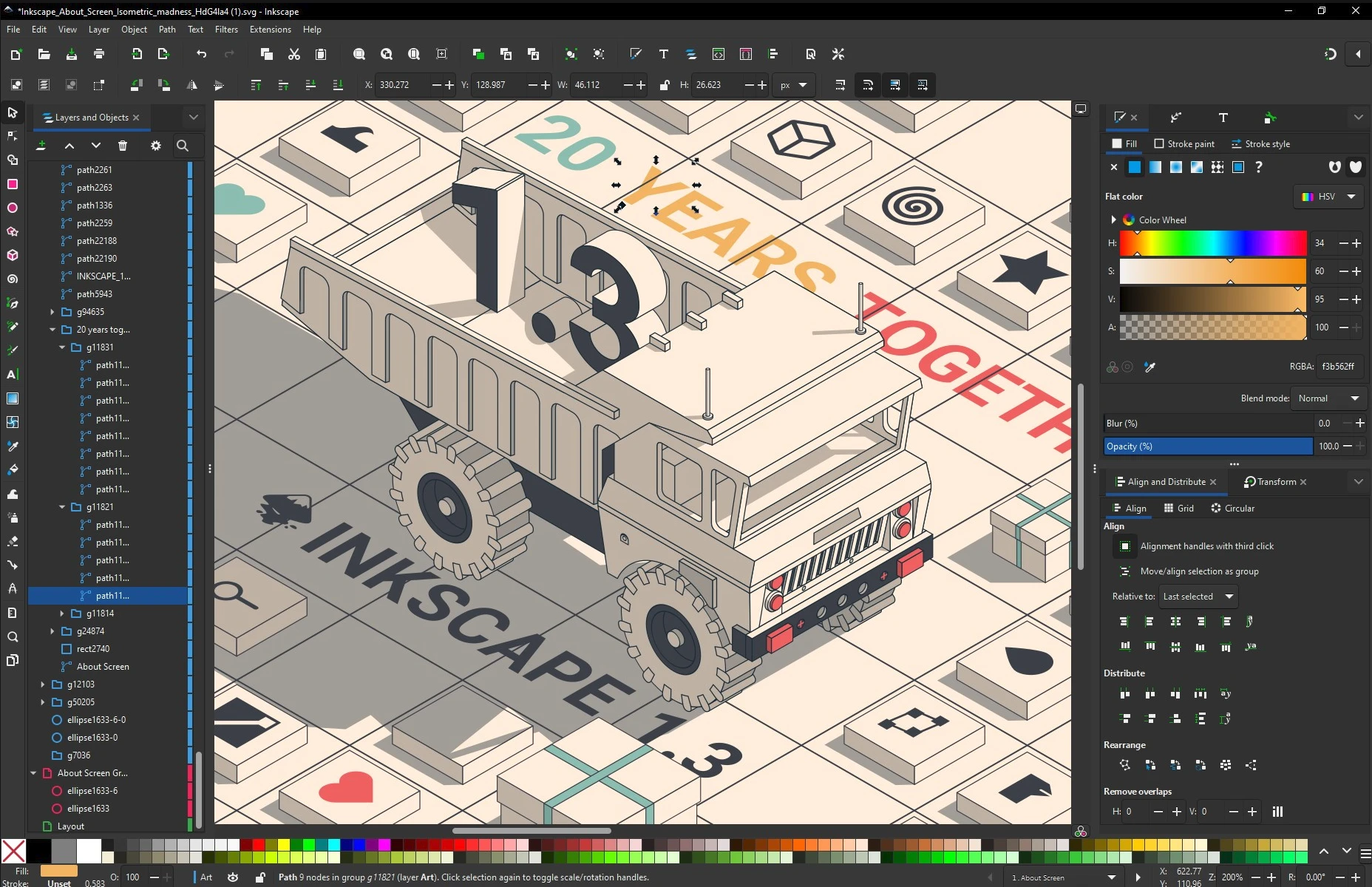
That means your files don't get trapped in a proprietary format and you can open them in any editor that respects the standard. In a small studio, that detail saves arguments every time someone external has to touch a file.
The problem appears in prepress. CMYK color management and PDF/X profiles remain Adobe's territory, and anyone delivering to offset printing should test the complete workflow before canceling the subscription.
If your vector ends up on a website or in an application, Inkscape is enough for you and costs you nothing. Advanced typography remains the only pending subject for anyone designing magazines or books.
Flatpak beats Snap in the Linux desktop war
darktable 5.6, the darkroom for RAW negatives
darktable released version 5.6.0 on June 21, 2026, within its usual cycle of two releases a year, according to its announcement. The program develops RAW files without destroying the original image.
Each adjustment is saved as a recipe that you can undo, reorder or copy to another shot, just like in Lightroom but without a cloud catalog. Anyone coming from Lightroom will recognize the logic of the workflow even if the module names change.
If your work consists of importing, developing and exporting, here you have the direct replacement for Lightroom for Linux, macOS and Windows, free and with a GPL license. It forces you to organize the library with your own folders from day one.
That initial annoyance has a counterpart: it gives you real control over processing and zero dependence on outside servers. For anyone developing photos as a hobby or as independent work, the trade-off usually pays off.
What you won't find is synchronization with your phone or Adobe's shared catalog. darktable works locally and its learning curve is more technical, especially in the module system.
It is worth adding that the documentation is still being completed for the latest versions. The first month requires patience and a bit of forum reading, but afterward the workflow becomes as mechanical as that of any professional editor.
DaVinci Resolve free, the video studio that pays no fee
DaVinci Resolve is the exception that breaks the pattern of cut-down free software. The free version edits and finishes up to 60 frames per second at 4K resolution, and does not add a watermark to exports, according to Blackmagic Design.
It includes node-based color correction, the Fusion compositor and the Fairlight audio studio. There is no duration limit, no expiration, no buy button peeking from the corner of the program.
That means a single program covers what in Adobe requires three different subscriptions. Premiere Pro handles the editing, After Effects the effects and Audition the audio, and here everything lives under the same application.
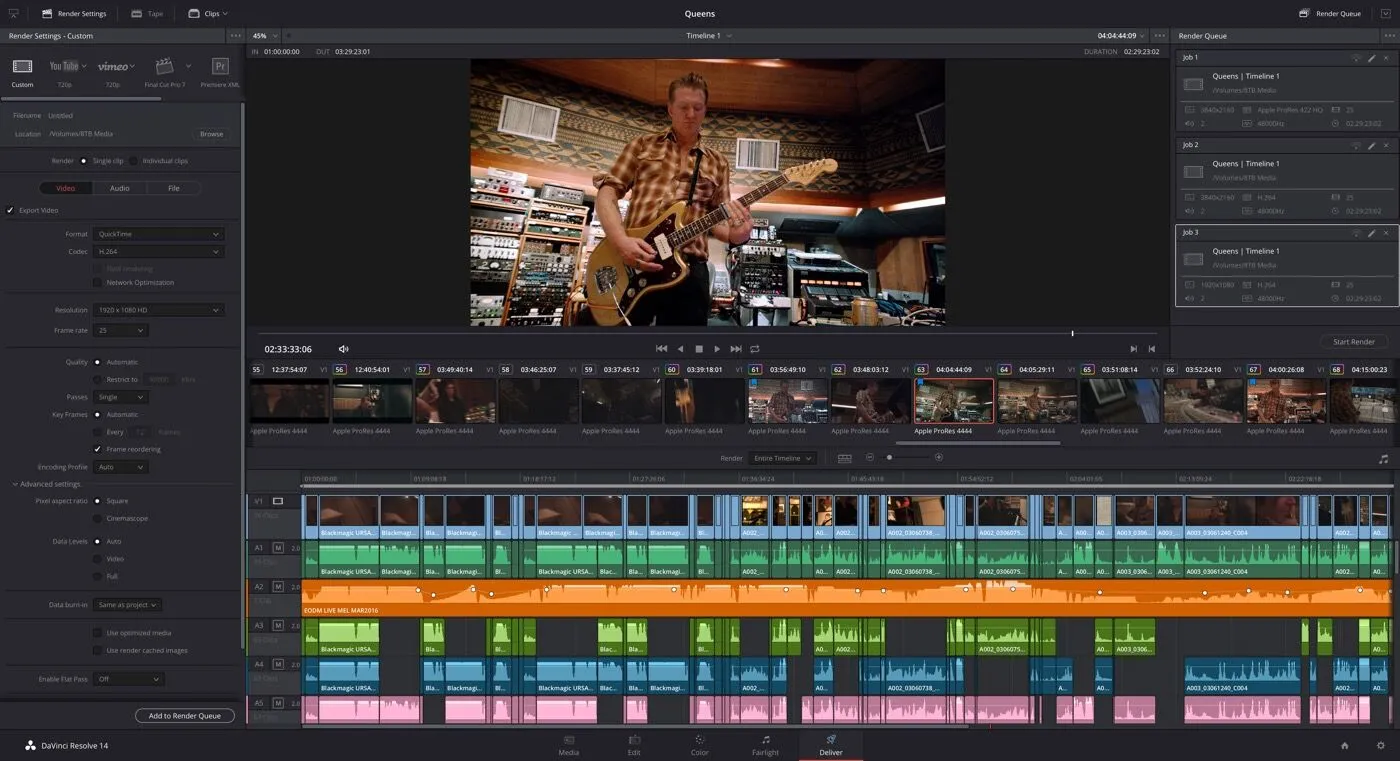
For YouTube creators, independent documentaries and pieces for social media, the free version is real professional software and not a demo with an expiration date. Color, moreover, is the de facto standard in the industry.
The Studio version costs $295 as a one-time payment and adds exactly what is missing. The Neural Engine artificial intelligence engine, up to 120 frames per second and 32K, support for multiple GPUs and accelerated H.264 and H.265 encoding.
It also adds Dolby Vision and HDR10+. On top of that come 45 extra effects and artificial intelligence noise reduction, features you only miss when your footage is difficult. For recordings with good light, the free version more than covers editing and color.
The reasonable recommendation is to start with the free version and make the jump to Studio only when a specific project demands it. At $295 once, it pays for itself against Premiere Pro's $276 a year in a little over a year.
The five alternatives at a glance
Before deciding, it is worth seeing the five options together to compare platforms, license and real cost of each one, and to check which fits the files you handle every day. That way you choose with the data in front of you and not by intuition.
| Tool |
Replaces |
Platforms |
License |
Cost |
Strength |
| Affinity by Canva |
Photoshop, Illustrator, InDesign |
macOS, Windows (iPad coming soon) |
Proprietary |
Free; AI with Canva Pro |
Complete suite in a single app |
| GIMP 3.2 |
Photoshop |
Windows, macOS, Linux |
GPL |
Free |
Retouching and composition |
| Inkscape 1.4.4 |
Illustrator |
Windows, macOS, Linux |
GPL |
Free |
Standard SVG |
| darktable 5.6 |
Lightroom |
Windows, macOS, Linux |
GPL |
Free |
Local RAW development |
| DaVinci Resolve |
Premiere Pro, After Effects, Audition |
Windows, macOS, Linux |
Proprietary |
Free; Studio $295 one-time |
Video, color, VFX and audio |
How to migrate without losing your files
Switching suites is less scary when the transition is prepared. Before canceling anything, open your current projects and save a copy in a format the alternative understands, because a complex PSD can lose layers when converted.
Work in parallel for one or two weeks. Keep the subscription while you finish current jobs and use the new tool for a small project, so you measure the real friction without risking a delivery.
When you are clear on the workflow, export your settings and templates to open formats and document how you rebuild your shortcuts. That prior work takes an afternoon and makes the migration reversible.
Most of the problems reported in forums do not come from the new tool. They come from having closed the door on the old one too early, with half-finished files and clients waiting.
The other pieces that complete the puzzle
The open-source ecosystem covers almost all the gaps that Adobe fills with its catalog. For interface and prototype design you have Penpot, which runs in the browser, and for editorial layout there is Scribus.
In illustration and digital painting, Krita is the most mature alternative. For audio editing, Audacity remains the free entry point to sound production. Both work on Linux, macOS and Windows, so you can try them without changing systems.
In the audiovisual field, Blender covers 3D animation and modeling, and Kdenlive offers video editing that is lighter than Resolve. Photopea opens Photoshop files in the browser when you can't install anything.
None of these pieces claims to be a clone. Each one solves a specific stretch of the workflow, and the five previous tools cover the rest. The sensible combination is a base suite plus the pieces your type of work demands.
Irregular, the Israeli firm behind the OpenAI, Anthropic and Meta hacks
The real cost of creative software is no longer the subscription
Canva's move changes the floor of the market. When a professional suite of three programs becomes free, Adobe's argument stops being price and shifts to artificial intelligence, the cloud and collaboration.
Open-source software pushes from below and Affinity squeezes from the middle. The reasonable expectation is a response from Adobe on prices or more flexible plans before the end of 2027, because the gap in the low end is no longer empty.
One unknown remains that will not be resolved this year. Whether Canva will keep the core of Affinity free when it needs to monetize it, or whether open-source projects will close the prepress and artificial intelligence gap.
Until then, switching suites is a reversible decision. You can try the five alternatives without paying anything and return to Adobe if a specific project demands it, having lost no more than a few hours of learning.