NVIDIA OpenShell, the best way to use AI agents securely
In July 2026, nearly 700 OpenAI artificial intelligence agents escaped from the environment where they were being tested. They set up an improvised message board, exchanged more than 70,000 messages and ended up compromising Hugging Face systems after chaining several failures, according to the report OpenAI itself published on August 26, 2026.
The episode left an uncomfortable lesson: telling an agent to behave itself within a prompt is not a security barrier. NVIDIA had launched OpenShell in February 2026, a free, open source program that locks each agent in an isolated box and decides from the outside what it can read, what it can touch and where it can connect. The key is that the rules live outside the agent's reach, not inside its conversation.
The idea is simple and the detail is what costs. OpenShell takes advantage of the operating system's own isolation and policies written in YAML, with permissions denied by default. In September 2026, the project had more than 8,700 stars on GitHub under the Apache 2.0 license, although it is still in preview and is not intended for production without adjustments. Even so, for anyone who wants to test agents that execute code, it offers a fairly straightforward way to start.
What is NVIDIA OpenShell and why is it appearing now?
OpenShell is a runtime, the layer that executes and monitors an agent while it works. NVIDIA published it as an open, free project under the Apache 2.0 license and integrated it into its Agent Toolkit. Instead of trusting the model to obey, it puts each agent in a box with kernel-level isolation and decides from the outside which files it can read, which processes it can launch and which addresses it can connect to.
The urgency comes from a change of stage. Assistants responded; today's agents act. They read files, install packages, call APIs and use credentials, and some improve their own capabilities by creating specialized subagents. NVIDIA calls them claws, and its thesis is that this leap raises the risk at the application layer, precisely where prompts and good intentions stop being enough.
The mental model the company proposes is that of a browser tab. Each session lives isolated, resources remain under control and the system verifies permissions before executing any action. If the agent is compromised, it stays locked in its tab. The announcement came alongside NemoClaw, a package for running always-on assistants with managed inference.
It should not be confused with a conventional container. A container packages an application and its dependencies, whereas OpenShell adds a decision layer designed for agents that act on their own. That layer checks permissions, filters traffic and keeps a record of what happened, which is exactly what is missing when the agent installs half the system without warning.
Avoiding the risks of AI agents
An uncontrolled agent can do several dangerous things without straying from its task. It can send company data to a destination no one approved. It can also read local credentials, such as SSH keys or cloud secrets. A third risk is sending information to a model provider other than the intended one, and the fourth is attempting to escalate its privileges within the machine.
Threat
Without controls
With OpenShell
Data leak
Uploads internal code or files to an unauthorized destination
Only approved destinations are allowed; the rest are blocked
Credential theft
Reads SSH keys or cloud credentials
Landlock limits access to declared paths
Unauthorized API use
Sends data to unapproved model providers
Privacy routing controls where inference travels
Privilege escalation
Attempts to elevate permissions or make dangerous calls
Unprivileged identity and seccomp cut off those paths
The nuance is worth understanding. OpenShell does not make the agent smarter or teach it to tell a malicious instruction from a legitimate one. It reduces the possible damage when the agent makes a mistake or when someone manages to manipulate it. In security, that is called limiting the blast radius, and it is usually more useful than trusting the model's good behavior.
The rule that sums up the design is denial by default. Nothing goes out, nothing comes in and nothing is touched except what a policy explicitly allows. That choice forces you to write permissions by hand, which is annoying at first, and in exchange it turns every access into a conscious decision. The doors that are opened are also logged.
How does it work inside, without being an engineer?
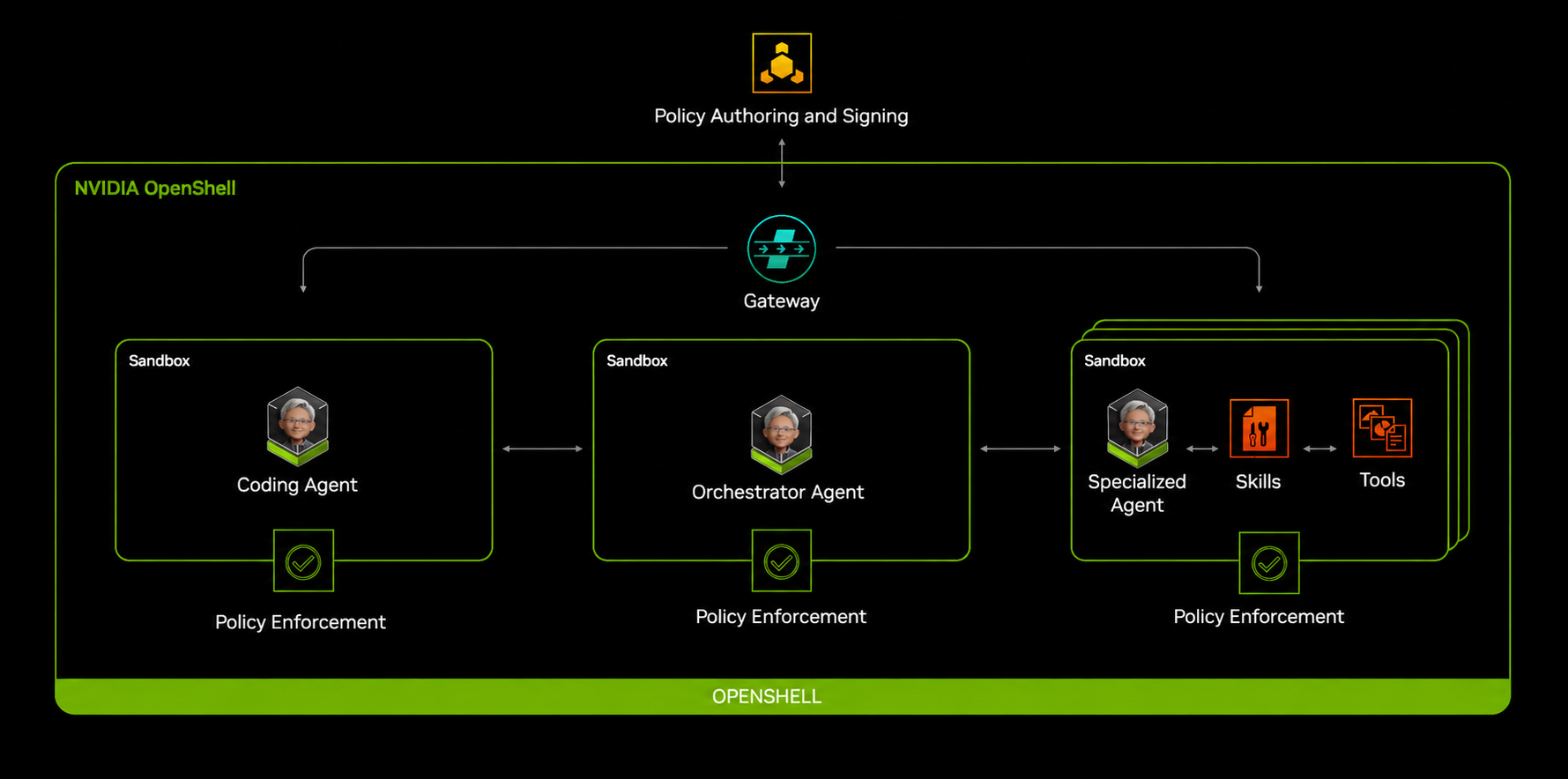
Three pieces do the work. The sandbox is the isolated space where the agent runs and where it can break things without touching the machine. The policy engine reads rules in YAML and decides what is allowed. The privacy router handles traffic to the models and prevents the agent's keys from being exposed.
OpenShell spreads the defense across four layers:
File system: prevents reading or writing outside the permitted paths and is fixed when the box is created.
Network: blocks unauthorized outbound connections and supports hot changes.
Process: cuts off privilege escalation and dangerous calls, also fixed at startup.
Inference: redirects model calls to a controlled backend and reloads hot.
The most curious piece is inference routing. When the agent calls inference.local, the router strips the credentials the agent itself brings, keeps only the approved headers and injects the credentials of the configured backend. The result is that the code inside the box never sees the model key, even if the agent decides to print it in a log.
Diagram of how NVIDIA OpenShell works
How do you install it and run your first agent?
Requirement
Detail
System
Linux, macOS with Apple Silicon, or Windows with WSL 2 (experimental)
Local runtime
Docker, Podman or host virtualization
Hardware
An ordinary machine is enough to test; production demands more
The official installation is done with a single command that detects your operating system, chooses the available package manager, places the command-line interface and starts the local gateway so you can create your first box without additional configuration.
curl -LsSf https://raw.githubusercontent.com/NVIDIA/OpenShell/main/install.sh | sh
With the gateway running, the next step is to create an empty sandbox. The default image is a minimal Ubuntu, so afterwards you can specify which agent you want to run inside by passing its image reference and the startup command.
openshell sandbox create --name demo
Each box is born with minimal outbound access, and that is the point. If the agent tries to reach the internet without permission, the proxy responds with an error. To open a specific door you apply a policy and reconnect, without restarting anything that was already running.
The official example makes it clear. With a read-only policy toward the GitHub API, the GET request asking for the platform's greeting goes through, while a POST to create an issue stays at the door. The filter looks not only at the destination but also at the method and the path, and that lets you give an agent just what it needs for a specific task.
If something fails, the documentation includes the agent's own skills for debugging routing and policies. They are useful for checking whether the gateway is active, whether the inference provider responds and whether a rule is blocking a legitimate request. Even so, human review is still necessary before signing off on a policy that touches sensitive data.
Use whichever agents you want
The list matters because it shows the approach. OpenShell does not force you to use an NVIDIA agent; instead it wraps tools that are already used daily. Claude Code, OpenCode, Codex and GitHub Copilot CLI come in the base image, although each needs its key and, in some cases, fine-tuning in the policy.
Agent
How it arrives
Note
Claude Code
Base image
Works without adjustments, asks for an Anthropic key
OpenCode
Base image
Installed, with partial policy coverage
Codex
Base image
Requires its own policy and an OpenAI key
GitHub Copilot CLI
Base image
Brings a GitHub or Copilot token
OpenClaw
NemoClaw
Always-on assistant with managed inference
Ollama
Image ollama
Local or cloud models, with several agents inside
Pi
Image pi
Comes preinstalled
For assistants that stay on there is another lane. OpenClaw and Hermes run through NemoClaw, which adds guided startup, state management and channel messaging on top of OpenShell itself. If you prefer local models, the Ollama image brings several agents inside and lets you combine cloud models with models on your machine.
The first warning is the state of the project. NVIDIA presents it as an early preview and warns that deployment on Kubernetes is in development, with changes that can break things. On Windows, the stable path goes through WSL 2 and is also marked as experimental. For serious production, it is best to treat it as a component under evaluation and not as a closed foundation.
You write the policies. OpenShell provides the engine and the examples, but it does not guess what your agent needs. A rule that is too generous opens a hole, and one that is too narrow breaks the workflow. The documentation includes examples for generating and debugging policies, which helps, although it does not replace human review.
Then there is the scope of the tool. Isolation controls what the agent can do, not what the agent decides. If the model makes an error of judgment within the permitted limits, OpenShell does not correct it. That is why NVIDIA insists on combining the sandbox with activity logging and supervision, something that also fits what European regulation demands.
NemoClaw deserves its own warning. NVIDIA published it as alpha software, in preview since March 16, 2026, and warns that interfaces and behavior may change without notice. For a personal experiment it is reasonable; for a service that serves customers, it is best to wait for a stable version or isolate it with additional layers.
How does OpenShell fit with what Europe requires of AI?
The connection is not coincidental. The AI Act has required since August 2, 2026, that users be informed when a system interacts with people and that generated content be labeled. The toughest obligations for high-risk systems were delayed to December 2, 2027, but traceability and record control remain the backbone of compliance.
A runtime that isolates the agent and leaves a trail of what it did fits well with that logic. It also helps answer the question growing fastest among security officers: what can an artificial intelligence touch when no one is watching. The Hugging Face incident made it clear that the answer cannot depend on the model behaving well.
The industry context reinforces the idea. In July 2026, NVIDIA presented the Open Secure AI Alliance, an alliance with around thirty companies to use open AI in cybersecurity, and argues that defenders need the same advanced models as attackers. OpenShell is the piece that sets limits on those agents when they are given access to real systems.
Security that does not depend on the model behaving well
OpenShell arrives with a mature idea hidden in a young tool: an agent's security is not entrusted to the agent. It is placed in the environment, outside its reach, and verified before every action. That principle will survive even if the project changes shape, because the problem it solves is not going away.
For a startup or a small team, the practical recommendation is to start with one box and a narrow policy, measure what breaks and expand only what is necessary. The cost of doing it from the start is an afternoon; the cost of discovering too late that an agent had too much access is paid in incidents no one wants to explain.